

AsliCV Review 2026: I Built My Resume, Cover Letter, and Motivation Letter — Here's What Actually Works
Hands-on AsliCV review: I built a resume, cover letter, and motivational letter, tested templates, Europass/ATS options, free PDF download, and the public resume link — with screenshots.
I build tools for a living, so I don't trust a resume builder's marketing copy. I trust what happens when I actually sit down, create an account, and try to get a finished PDF out of it without hitting a paywall. That's exactly what I did with AsliCV, and this review walks through every step I took, what worked, what didn't, and whether it's worth your time.
What Is AsliCV?
AsliCV (aslicv.com) is a free online resume, cover letter, and motivational letter builder. It offers a Europass-style CV option alongside ATS-friendly templates, a live preview editor, and a dashboard where every document you create is saved and downloadable. It also lets you publish your resume as a public link — something most builders in this space don't offer at all.
Free
PDF download
3
Document types
EU
Europass support
Live
Public resume link
My Experience Building a Resume From Scratch
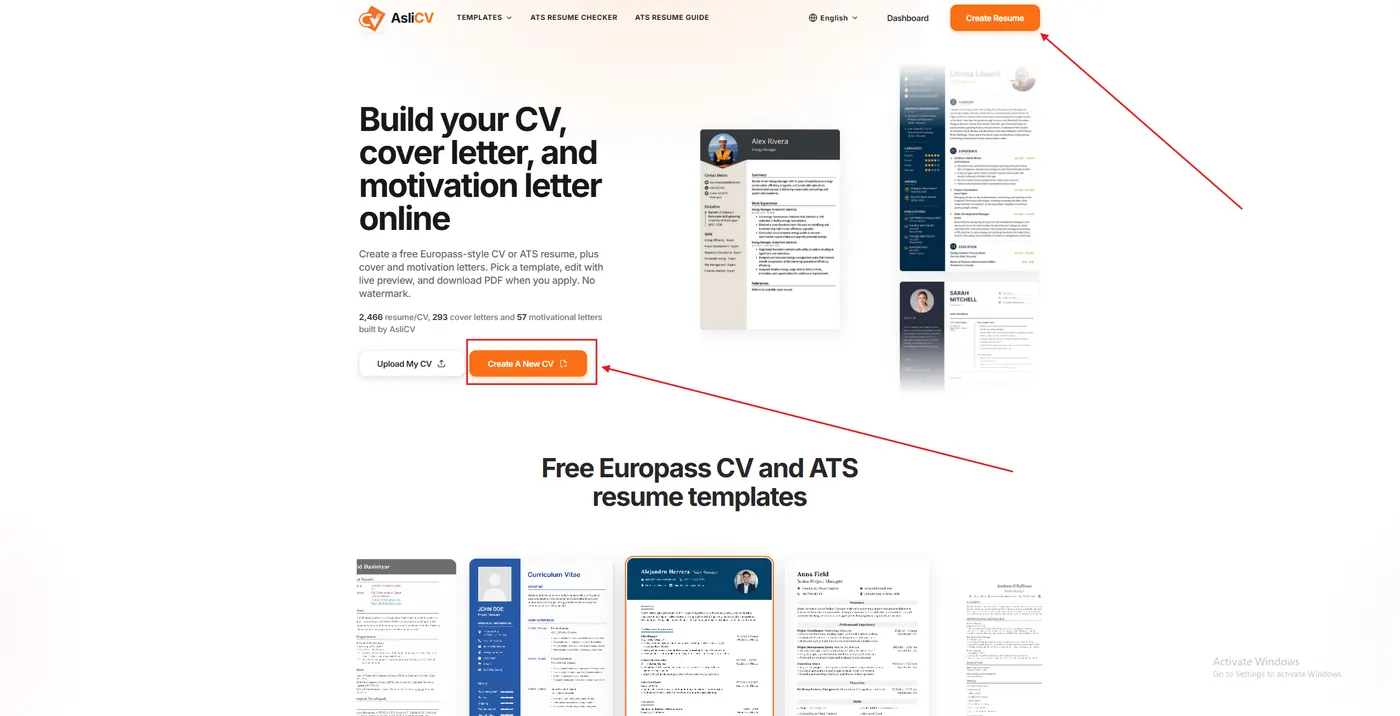
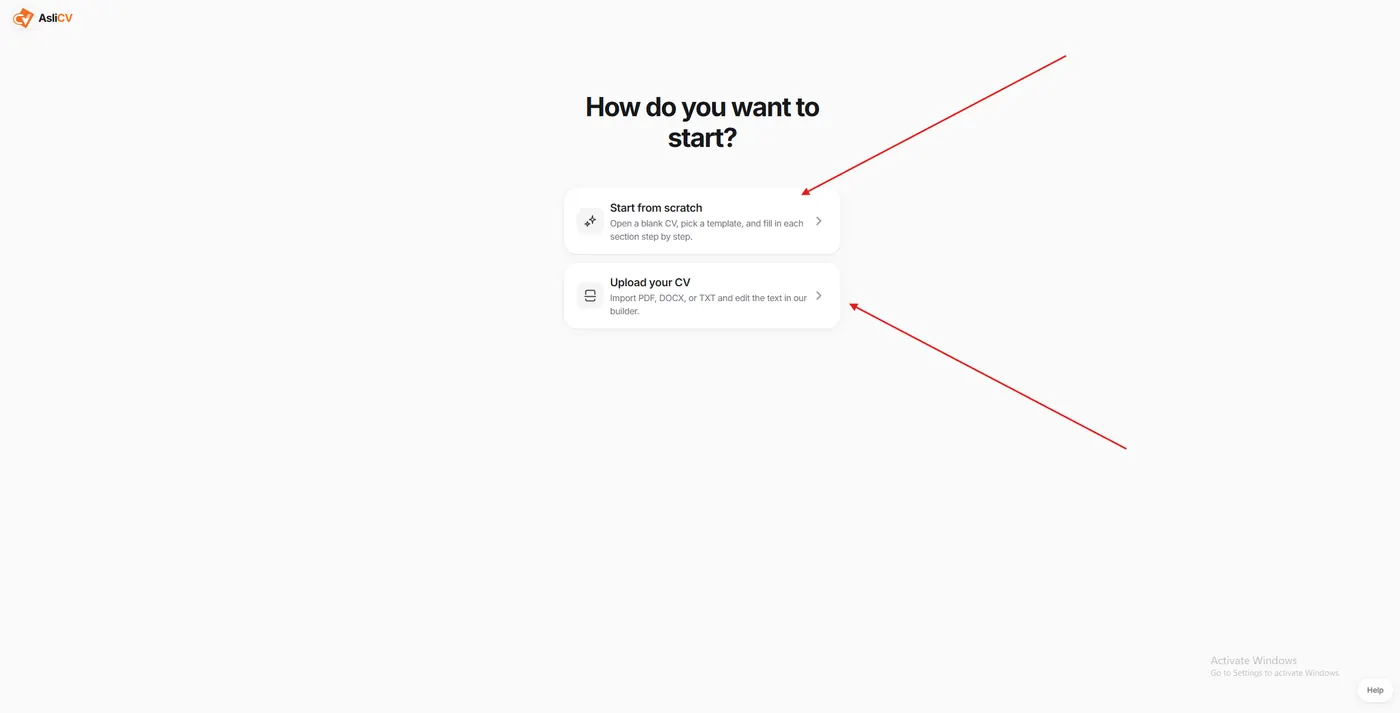
I started from the homepage, which gives you two clear paths: Upload My CV or Create A New CV. Since I wanted to test the full workflow, I chose to start fresh. The next screen asked a simple question — start from scratch or upload an existing CV to edit — and I picked "Start from scratch."
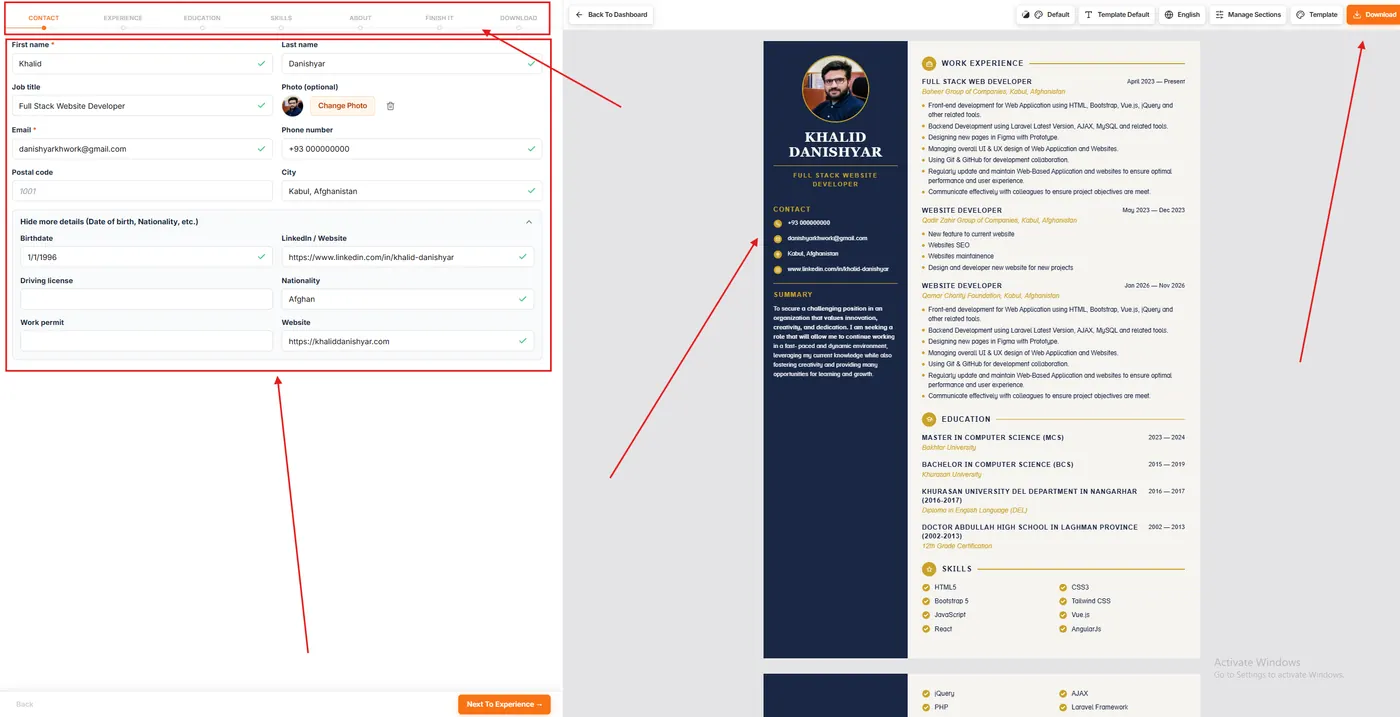
From there, the builder walks you through a step-by-step flow across seven tabs: Contact, Experience, Education, Skills, About, Finish It, and Download. This structure matters more than it sounds. A lot of resume builders dump every field on one long scrolling page and expect you to figure out the order yourself. AsliCV breaks it into stages, and a progress bar at the top shows exactly where you are.
The Contact tab is where I noticed the first thoughtful detail: sensitive or optional fields — birthdate, nationality, driving license, work permit — are tucked behind a "Hide more details" toggle instead of being shown by default. For someone applying to jobs across different countries where disclosure norms vary (something that matters a lot for Afghan and diaspora job seekers applying in the UK, Germany, or Canada), that's a small feature with real practical value.
As I filled in each field, a live preview updated instantly on the right side of the screen. My work history, education, and skills all populated a dark sidebar template in real time, with a photo, contact icons, and a clean two-column layout for experience and education. There was no lag, no "click preview to see changes" step — it just worked as I typed.
Templates — Is the Design Actually Good?
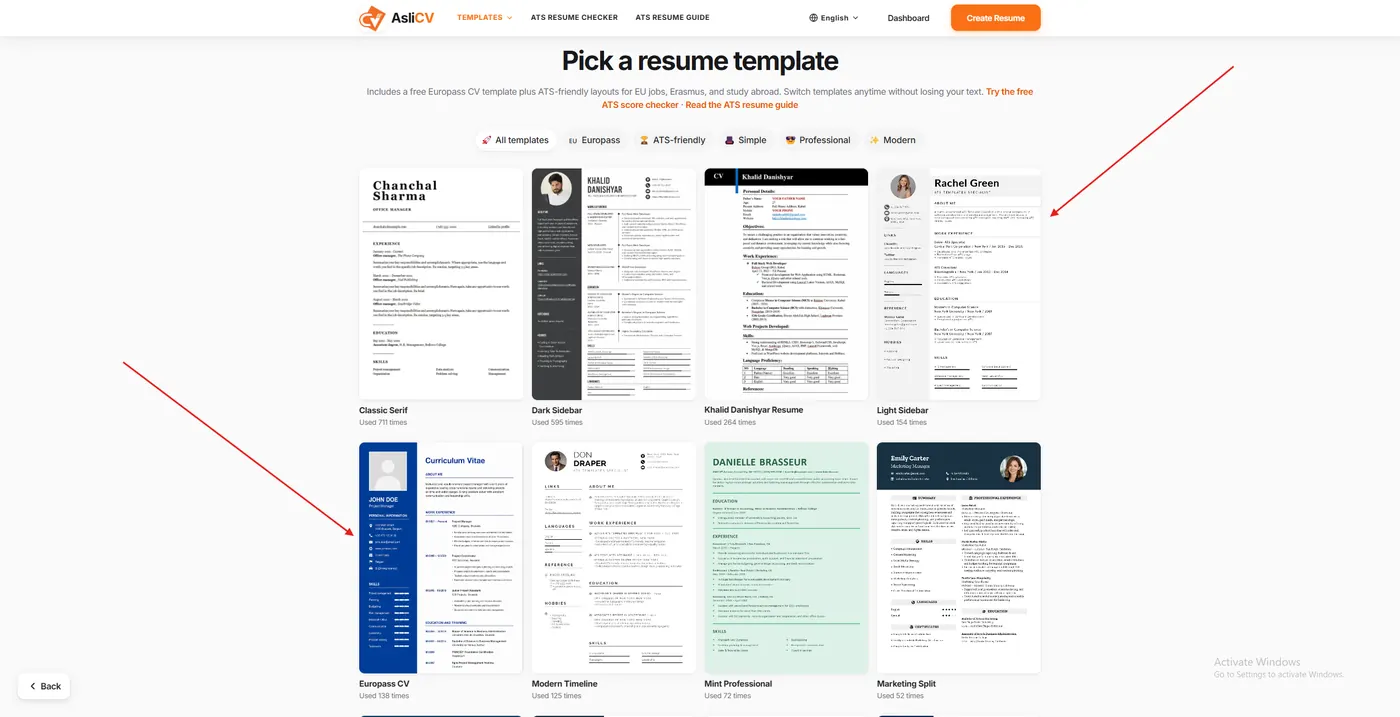
AsliCV's template library is larger than I expected from a free tool. Filtering options include All Templates, Europass, ATS-friendly, Simple, Professional, and Modern. I counted templates like Classic Serif, Dark Sidebar, Light Sidebar, Europass CV, Modern Timeline, Mint Professional, and Marketing Split, each showing a usage counter (for example, "Used 711 times") so you get a rough sense of popularity before committing.
The template I used — a dark navy sidebar with gold accent headers — rendered cleanly with no awkward text overflow, even with a fairly dense work history covering three jobs and four education entries. Section headers (Work Experience, Education, Skills) use a consistent icon-plus-underline style that stays readable both on screen and in the final PDF.
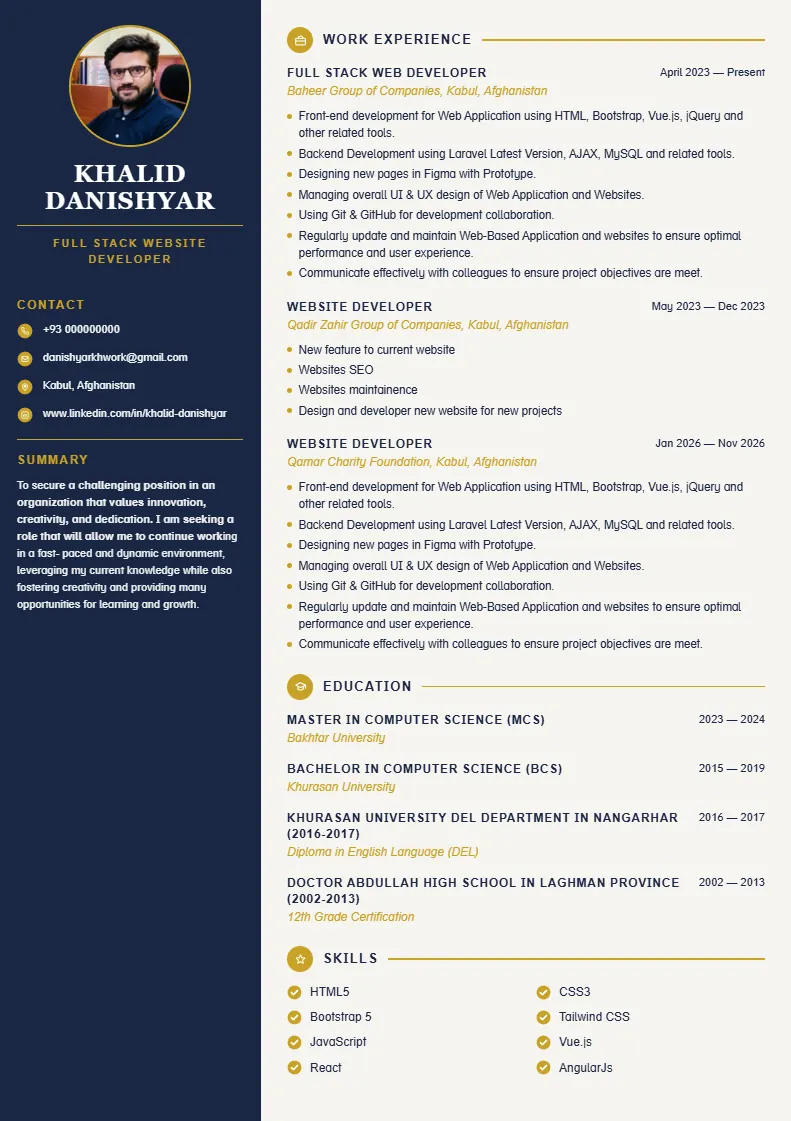
Compared to bloated builders that force you into Canva-style drag-and-drop editing (great for creativity, terrible for ATS parsing), AsliCV keeps every template structurally simple: single or dual-column text blocks, no decorative graphics blocking the parsing engine.
ATS-Friendliness and Europass Support
This is where AsliCV separates itself from generic "pretty resume" tools. Most ATS systems fail on resumes with tables, icons overlapping text, or multi-column layouts that confuse the parser. AsliCV's templates avoid that trap — text stays in clean blocks, and section headers use standard labels (Work Experience, Education, Skills) instead of creative renaming that ATS software can't map correctly.
The dedicated Europass CV template is a genuine differentiator. If you're applying for jobs, scholarships, or Erasmus programs anywhere in the EU, a Europass-format CV is often explicitly requested, and most free builders don't bother supporting that format at all. AsliCV does, out of the box, with the same field-by-field editor.
I didn't test their separate ATS Resume Checker tool during this build, but its presence on the main navigation (alongside an ATS Resume Guide) signals the platform is thinking about ATS compatibility as a core feature, not an afterthought.
Free vs. Paid — Is There a Catch?
I went through the entire flow — building the resume, hitting Finish It, and reaching the Download tab — without ever being asked to enter payment details or being blocked by a paywall. The Download button in the top-right corner was active and clickable at every stage once my required fields were filled.
This matters because it's the single most common complaint about "free" resume builders. Tools like MyPerfectResume let you build the entire resume for free and then lock the PDF export behind a trial subscription. AsliCV didn't do that in my test. I got a working download button with no hidden step.
Cover Letter and Motivational Letter Builder
Beyond the resume, my dashboard showed a separate section for cover letters and another for motivational letters, each with its own "New" button and independent Update/Download controls. I created a cover letter and a motivational letter alongside my resume, and each one is tracked separately with its own last-updated timestamp — useful if you're tailoring different letters for different applications and need to know which version is current.
This three-document setup (resume, cover letter, motivational letter) is genuinely useful for job seekers applying to EU-based programs or companies, where a motivation letter is often a separate requirement from a cover letter — a distinction a lot of builders don't even account for.
Publishing a Live Public Resume Link
The feature that stood out most is the ability to publish your resume as a public web page. From the dashboard, you set a username (mine became aslicv.com/khaliddanishyar), save it, and the resume goes live at that URL instantly. You get View Live, Copy Link, and Unpublish controls right there, plus a "Live" status badge so you always know if the page is currently public.
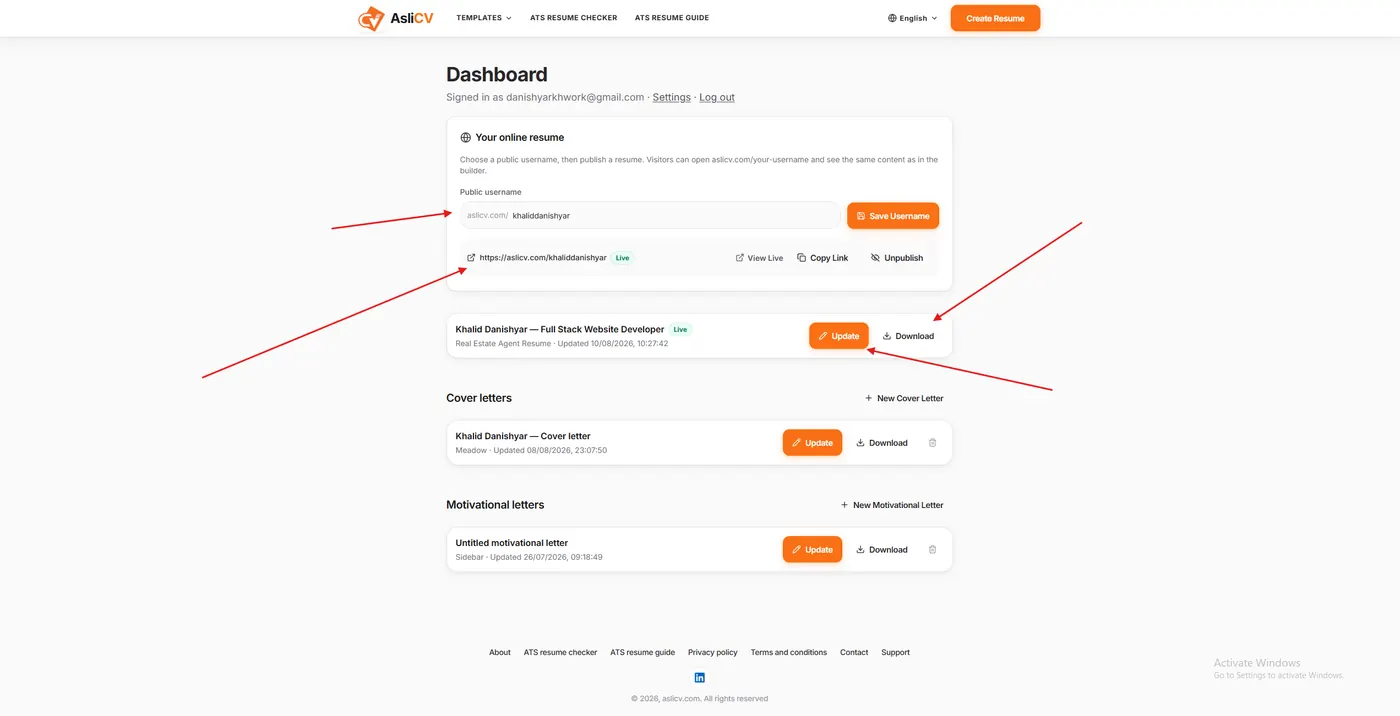
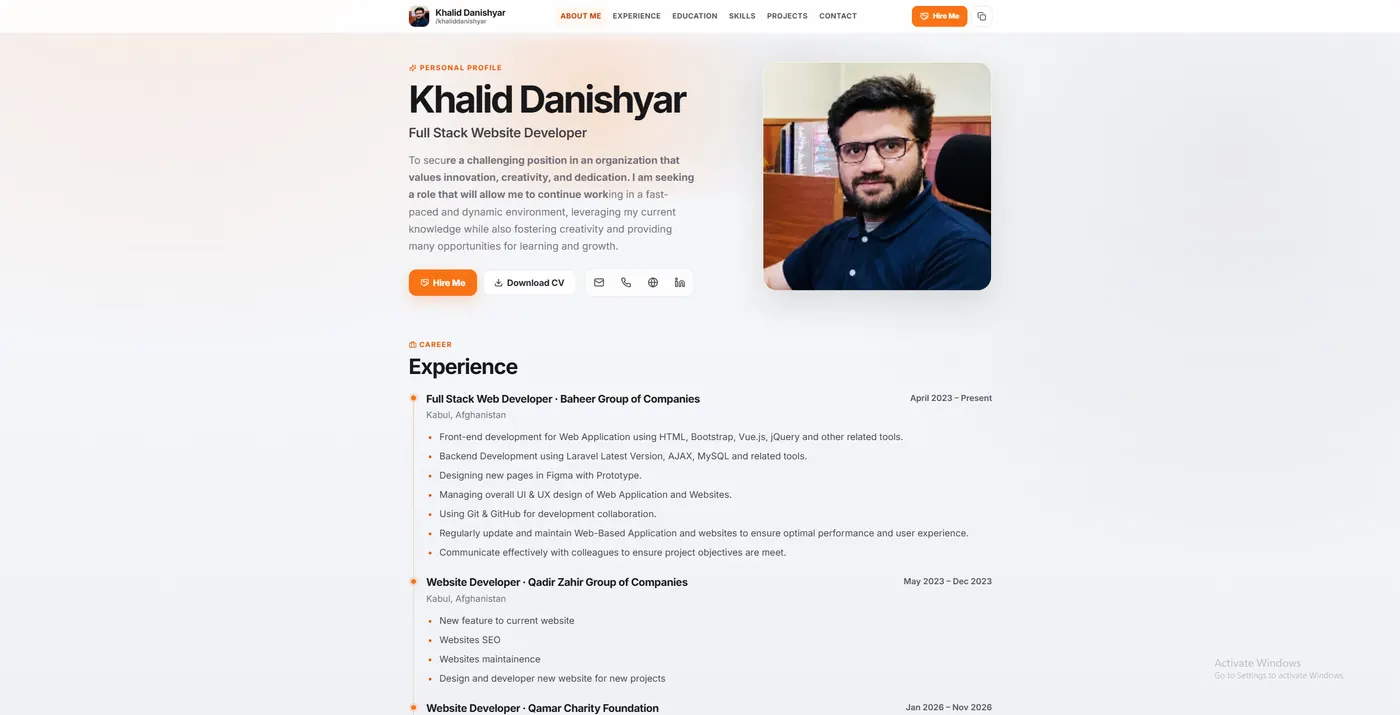
I can send that single link to a recruiter instead of attaching a PDF, and it renders the same content as my builder. For freelancers and consultants who want a lightweight, always-up-to-date resume link in an email signature or LinkedIn bio, this is a real advantage over builders that only ever output a static file.
Who Should Use AsliCV — and Who Shouldn't
Good fit if you:
- Want a genuinely free PDF download with no watermark or trial trap
- Need a Europass-format CV for EU job or study applications
- Want your resume, cover letter, and motivational letter in one dashboard
- Like the idea of a shareable public resume link instead of just a PDF
Maybe look elsewhere if you:
- Want heavy AI-generated bullet-point writing assistance built into the builder
- Need a huge library of highly decorative, design-forward templates (Canva still wins here for pure visual creativity)
- Are looking for built-in interview prep or job-matching features layered on top
My Verdict
AsliCV does the one thing most "free" resume builders promise and quietly fail to deliver: it lets you finish, download, and even publish a professional resume without paying or hitting a wall halfway through. The step-by-step builder is fast, the live preview is accurate, and the Europass support plus the three-document system (resume, cover letter, motivational letter) covers more ground than most single-purpose competitors. It's not the most visually elaborate builder on the market, but for anyone who wants a clean, ATS-safe resume out the door quickly — and free — it earned its spot in my toolkit.
Build a free resume, cover letter, and motivational letter — then publish a live link.
Open AsliCV →This review is based on my own hands-on use of AsliCV, including building a full resume, cover letter, and motivational letter, selecting a template, and publishing a live resume link.
Frequently asked questions
Frequently Asked Questions About AsliCV
Answers on free downloads, watermarks, public resume links, cover vs motivational letters, ATS templates, and importing an existing CV.